A LuLu card balance check can usually be completed through the LuLu Money app or a supported ATM. However, the correct method depends on whether you have a MyPay: MyCard salary card, a LuLu Travel Card, a partner-issued payroll card or a LuLu Hypermarket gift card. Check the product name and issuer printed on your card before choosing a balance-check method.
- Use The LuLu Money App For Compatible Salary And Travel Cards
- Use A Supported ATM When You Do Not Have Internet Access
- Follow The Issuer’s Instructions For Partner-Issued Payroll Cards
- Ask At A LuLu Hypermarket Service Desk For Gift Card Balances
- Avoid Unverified SMS Numbers And Unofficial Balance Websites
- Contact LuLu Exchange If Your Salary Or Balance Appears Incorrect
Last Updated: 07.09.2026
Which LuLu Card Do You Have?
The phrase “LuLu card” can refer to several different products in the UAE. Identifying yours first prevents failed logins and avoids entering sensitive information on the wrong website.
Card or Product How It Is Normally Used Suitable Balance Check Method
MyPay: MyCard Salary Card Receiving wages through the UAE Wage Protection System LuLu Money app, supported ATM or customer support
LuLu Travel Card Holding and spending AED and selected foreign currencies LuLu Money app
Partner-Issued Payroll Card Receiving wages through a bank or payment processor Issuer’s approved portal, app or supported ATM
LuLu Hypermarket Gift Card Paying for eligible purchases at LuLu stores Store customer-service desk, cashier or recent receipt
LuLu Money Account Sending remittances and managing transfers LuLu Money app
The MyPay: MyCard product is a WPS-compliant debit card offered through LuLu Exchange. It works through the Mastercard network and gives employees access to their wages without requiring a conventional current account.
The separate LuLu Travel Card is a Visa multi-currency product supported by Zand Bank. A LuLu Hypermarket gift card is a retail product and is not a salary card.
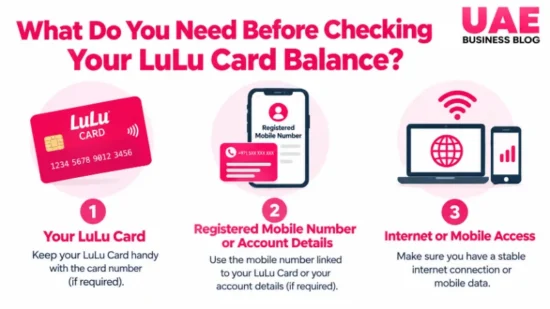
What Do You Need Before Checking Your LuLu Card Balance?
The details required depend on the method and card issuer.
Keeping the following information ready can make the process easier:
- Physical Card
- Registered UAE Mobile Number
- App Login Details
- ATM PIN
- Card ID Or Requested Card Digits
- Emirates ID For Branch Assistance
- Recent Transaction Reference For A Balance Dispute
Never disclose your complete PIN, password or one-time password to another person. Customer-support staff may verify your identity, but they should not ask you to reveal confidential security credentials.
How to Check Your LuLu Card Balance Through the LuLu Money App?
The LuLu Money app is the most convenient starting point for compatible salary and travel cards. It allows cardholders to manage their card and review activity without visiting a branch.
To check the balance through the app:
- Download or open the official LuLu Money app.
- Sign in using your registered details.
- Complete any OTP, biometric or PIN verification requested by the app.
- Open the card or wallet area.
- Select the relevant salary or travel card.
- Review the available balance and recent transactions.
The wording and position of menu options can change after an app update. Look for sections such as cards, wallets or account management rather than relying on an exact button name.
For compatible salary cards, the app can also provide transaction history, card controls, usage limits, PIN-management options and the ability to block or replace a card. The features displayed may depend on the card version and the customer’s account status.
If the card does not appear, confirm that the mobile number registered with LuLu Exchange matches the number used for the app. Do not repeatedly create new accounts, as this could make verification more difficult.
How to Check Your LuLu Card Balance at an ATM?
An ATM balance enquiry is useful when mobile data is unavailable or the app cannot be accessed. Insert the card, enter the PIN and select the balance-enquiry option. The available amount should appear on the screen, and some machines may offer a receipt.
LuLu Exchange identifies Emirates NBD, Emirates Islamic Bank and Mashreq Bank among the UAE banks providing cash access for its salary-card customers.
Availability may differ by card, ATM and network, so check the branding on the card or its usage pack if a machine rejects it.
Follow these steps:
- Use a supported ATM in a secure location.
- Insert or tap the card as instructed.
- Shield the keypad while entering the PIN.
- Select Balance Enquiry.
- Choose the relevant account if prompted.
- Note the available balance and collect the card and receipt.
Do not assume every ATM balance enquiry is free. Charges vary by product and network.
For example, the LuLu Travel Card has its own fee schedule, which is separate from the terms applying to a WPS salary card. Check the latest key facts statement or card usage pack before making repeated enquiries.
Can You Check Your LuLu Card Balance Online Without the App?
There is no single online balance-check page that can safely be treated as suitable for every LuLu-branded card.
Some partner-issued prepaid or payroll cards may use an approved card-inquiry portal, while LuLu salary and travel card users may be directed to the LuLu Money app.
The My Pay Portal should not be confused with a personal balance-check website. It is primarily an employer-facing payroll system used for functions such as uploading salary files and managing wage processing.
If your card carries the name of a bank or payment processor, use only the inquiry page identified by that issuer.
Check that the website address is correct and reached through an official source. If the portal does not recognise the details, stop retrying and contact the issuer or LuLu Exchange.
Can You Check Your LuLu Card Balance by SMS?
Some unofficial online instructions claim that LuLu balances can be checked by sending a message containing a card number to a short code. This method is not clearly confirmed in LuLu Exchange’s current public card information.
Do not send your full card number to an unverified SMS number. If an SMS service is mentioned in the documents supplied with your card, confirm the number and message format with LuLu Exchange before using it.
The app, a supported ATM or official customer support provides a safer alternative when the SMS method cannot be verified.
How to Check a LuLu Travel Card Balance?
The LuLu Travel Card is different from the MyPay: MyCard salary product. It is a prepaid Visa travel card that can hold an AED base wallet and up to six active currency wallets.
Cardholders can check balances and transactions in real time through the LuLu Money app. After signing in, select the Travel Card and then choose the relevant currency wallet.
Check the wallet currency carefully because the balance in one currency may not represent the total held across the card.
The app can also be used to:
- Top Up A Currency Wallet
- Switch Between Supported Currencies
- Review Card Transactions
- Set Spending Limits
- Freeze A Lost Card
- Lock Or Unlock The Wallet
- Control Contactless Payments
Fees for ATM withdrawals, balance enquiries, replacement and inactivity can apply to the Travel Card. These charges are product-specific and should not be used to describe a LuLu salary card.
How to Check a LuLu Hypermarket Gift Card Balance?
A LuLu Hypermarket gift card is a shopping product rather than a WPS salary card. It therefore may not appear in the LuLu Money app.
The safest options are to present the gift card at a participating LuLu Hypermarket customer-service desk, ask a cashier to confirm the remaining value before payment or review the latest purchase receipt if it displays the balance.
Terms, validity and redemption rules can vary by card or promotion, so check the information supplied with the card rather than assuming a standard expiry period.
LuLu Card Balance Check Methods Compared
Method Suitable Card Internet Needed Information Required Possible Cost
LuLu Money App Compatible salary and travel cards Yes Registered login and verification Normally no fee to view in-app
Supported ATM Salary, payroll or travel card depending on network No Physical card and PIN A balance-enquiry fee may apply
Approved Issuer Portal Certain partner-issued cards Yes Card-specific identifying details Usually shown before use
LuLu Exchange Branch Salary-card support and account problems No Card and identity documents Depends on the requested service
Customer Support Balance problems, blocked cards and complaints Phone connection required Identity and transaction details Normal call charges may apply
Store Service Desk LuLu Hypermarket gift cards No Physical gift card Normally no enquiry charge
The app is usually the most practical option for regular checks. An ATM suits users without internet access, while branch or telephone support is more appropriate when a salary is missing, a card is blocked or the displayed balance cannot be explained.
What Does Your LuLu Card Balance Show?
The figure displayed as the available balance is the amount that can normally be spent or withdrawn at that moment. It may not be the same as the most recent salary credit or the total of all transactions shown in the history.
Common balance terms include:
- Available Balance: The amount currently available for purchases or withdrawals
- Salary Credit: The wage payment received from an employer
- Pending Transaction: An authorised payment that has not completed settlement
- Reversal: Money returned after a transaction was cancelled or failed
- ATM Hold: A temporary deduction connected with an attempted cash withdrawal
A pending card payment can temporarily reduce the available balance even before it appears as a completed transaction. A reversal may also take time to display. Review recent activity before concluding that money has disappeared.
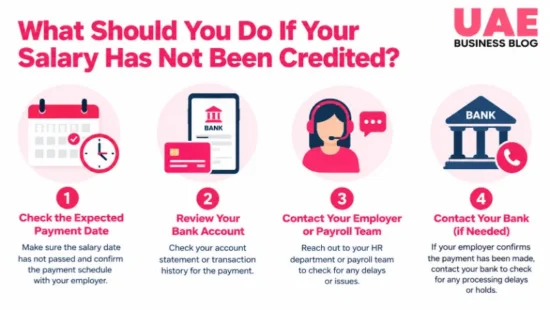
What Should You Do If Your Salary Has Not Been Credited?
A missing salary does not always indicate a card fault. The employer must first submit and fund the payroll file through the Wages Protection System.
Take the following steps:
- Check the card’s transaction history for a recent salary credit.
- Confirm the normal salary date with your employer.
- Ask payroll or HR whether the salary file was submitted and funded.
- Confirm that the correct employee and card information was used.
- Contact LuLu Exchange if the employer confirms successful submission.
- Record the complaint reference number and keep supporting documents.
When contacting support, provide the registered mobile number, expected salary amount, relevant date and any employer or transaction reference available. Avoid posting card or salary details publicly on social media.
Why Is Your LuLu Card Balance Incorrect?
Problem Possible Cause Recommended Action
Balance Is Lower Than Expected Pending purchase, ATM fee, withdrawal or other completed transaction Compare the available balance with recent activity
Salary Does Not Appear Employer submission, funding or processing issue Confirm the payroll status with HR before contacting LuLu
Card Is Missing From The App Different registered number or incomplete card linking Verify the registered mobile number with support
ATM Rejects The Card Unsupported machine, damaged card or blocked status Try a confirmed supported ATM or contact LuLu
OTP Does Not Arrive Old mobile number, weak signal or temporary delay Confirm the registered number and wait before requesting another OTP
Payment Is Shown Twice One entry may be pending while another is completed Monitor the transaction status and report it if both settle
Unknown Payment Appears Possible unauthorised use Freeze or block the card and contact support immediately
Failed Withdrawal Reduced Balance ATM hold or incomplete reversal Keep the receipt and report the date, ATM and amount
Refreshing the app can solve a temporary display problem, but it will not correct a genuine payroll, transaction or card issue. Save receipts and take note of transaction references before contacting support.
What Should You Do If the App Does Not Show Your Card?
First, update the LuLu Money app and confirm that the phone has a stable connection. Sign in with the mobile number registered for the card and check whether an identity-verification step remains incomplete.
If the problem continues, do not attempt to add the card through an unrelated website. Contact LuLu Exchange or visit a branch with the card and Emirates ID. A replacement SIM, new phone number or mismatch in customer records may require additional verification.
How to Handle a Lost, Stolen or Blocked LuLu Card?
Act quickly if the card is lost or an unfamiliar transaction appears. Use the app to freeze or block the card where that feature is available, then notify LuLu Exchange. Record the time the loss was noticed and identify any payments you do not recognise.
Do not continue entering the PIN after repeated failures, as this may trigger a security block. Contact support for the correct reset or replacement process. Replacement fees and identity requirements can depend on the card type.
How to Check Your LuLu Card Balance Safely?
- Download The App Only From An Official App Store
- Access Card Portals Through The Issuer’s Official Website
- Keep Your PIN, Password And OTP Private
- Avoid Balance Checks On Public Wi-Fi
- Shield The Keypad When Using An ATM
- Ignore Messages Threatening Immediate Card Closure
- Freeze The Card If Suspicious Activity Appears
- Review Transactions Regularly
A genuine balance check should not require you to transfer money, install remote-access software or disclose an OTP to a caller. End the conversation and contact LuLu Exchange directly if someone makes such a request.
How to Contact LuLu Exchange About a Balance Problem?
LuLu Exchange’s UAE customer service hotline is 600 522 204 and is listed as operating 24 hours on all days. Customers may also email customer care or visit a nearby LuLu Exchange branch.
Include the following information when raising a complaint:
- Registered Mobile Number
- Clear Description Of The Problem
- Transaction Reference Number
- Date And Approximate Time
- Transaction Or Salary Amount
- ATM Or Merchant Details Where Relevant
LuLu states that a complaint reference number should be assigned within one calendar day.
If a satisfactory resolution is not reached within 15 calendar days, the customer may escalate the complaint to Sanadak, the UAE’s independent financial ombudsman unit. Keep the original complaint reference because it may be needed during escalation.
Conclusion
The most reliable LuLu card balance check depends on the product you hold. Compatible salary and travel cards can usually be managed through the LuLu Money app, while supported ATMs provide an offline option.
Partner cards and Hypermarket gift cards may follow different processes. Check the issuer first, avoid unverified SMS numbers or balance websites and contact LuLu Exchange promptly when a salary, transaction or available balance appears incorrect.
Frequently Asked Questions
What Is the Fastest Way to Check a LuLu Salary Card Balance?
The LuLu Money app is normally the quickest option for a compatible salary card because it can display card activity and account-management features in one place.
Can I Check My LuLu Card Balance Without the App?
Yes. Depending on the card, you may use a supported ATM, an issuer-approved inquiry portal, LuLu Exchange support or a branch.
Is There an Official LuLu Balance Check Website?
There is no single public balance page suitable for every LuLu card. Follow the issuer information printed on the card and avoid treating the employer My Pay Portal as a personal balance tool.
Can I Check My LuLu Card Balance by SMS?
Public LuLu information does not clearly confirm a universal SMS balance service. Verify any number and message format with LuLu Exchange before sending card information.
Why Is My Salary Not Showing on My LuLu Card?
The employer may not have submitted or funded the payroll file, or processing may still be underway. Confirm the payroll status with HR before raising a card complaint.
Does LuLu Charge for an ATM Balance Enquiry?
It depends on the card and ATM network. Check the fee schedule or card usage pack for your specific salary, payroll or travel card.
Can I Check My LuLu Card Balance Outside the UAE?
App access may work abroad when your account, internet connection and verification method remain available. ATM access and fees depend on the card’s international network and terms.