
Last Update – 23-10-2026
Running out of mobile credit can be inconvenient, particularly when you need to make an urgent call, send a message or stay connected with family.
Fortunately, Etisalat, now operating under the e& UAE brand, allows customers to share mobile credit with eligible prepaid users through a simple transfer service.
If you are wondering how to send credit Etisalat, the quickest method is to dial *100*MobileNumber*Amount# from your phone.
You can also transfer credit through the e& UAE mobile app, request credit from another customer or send prepaid mobile credit internationally to supported destinations.
However, understanding the applicable transfer fees, transaction limits and eligibility requirements is important before confirming a transaction.
This guide explains the available Etisalat credit transfer methods in the UAE, including updated codes, real cost examples, international transfer instructions, security options and solutions to common transfer problems.
What Is the Etisalat Credit Transfer Code in UAE?
The main Etisalat credit transfer code is *100*RecipientNumber*Amount#.
This code allows eligible e& UAE prepaid and postpaid customers to transfer mobile credit directly to another active Etisalat prepaid number.
For example, to send AED 20 to 0501234567, dial:
*100*0501234567*20#
Press the call button, review the transaction details and follow the confirmation instructions.
The process does not require mobile internet access or an additional subscription to the credit transfer service.
Etisalat Credit Transfer Codes at a Glance
| Service | Code or Method |
| Send local mobile credit | *100*MobileNumber*Amount# |
| Request credit from someone | *107*MobileNumber*Amount# |
| Check prepaid balance | *121# |
| Send international credit | SMS the international number to 1700 |
| Open international credit transfer menu | *100# |
| Transfer credit with a PIN | *100*MobileNumber*Amount*PIN# |
| Request a credit transfer PIN | SMS CTPIN to 1010 |
| Change existing transfer PIN | *143*OldPIN*NewPIN# |
| Access Reserve Credit | *108*1# |
These codes relate to different services. Sending credit, requesting credit and borrowing emergency credit are not the same transactions.
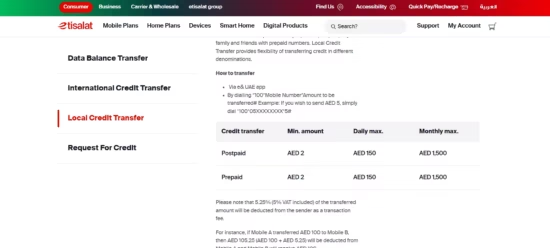
Official Etisalat credit transfer code for sending mobile balance in the UAE.
How to Send Credit Etisalat Using the USSD Code?
The USSD method is generally the fastest way to share mobile balance between eligible Etisalat accounts. It works without installing an application or using mobile data.
Step 1: Open Your Mobile Phone Dialler
Open the Phone application on your smartphone.
Ensure that the active SIM is your e& UAE number. If your phone supports two SIM cards, select the correct SIM before sending the command.
Step 2: Enter the Etisalat Credit Transfer Code
Type:
*100*RecipientNumber*Amount#
Replace the recipient number with the complete UAE mobile number and enter the amount you want to send in dirhams.
For example:
- To transfer AED 5: *100*0501234567*5#
- To transfer AED 10: *100*0501234567*10#
- To transfer AED 25: *100*0501234567*25#
- To transfer AED 50: *100*0501234567*50#
The mobile number used in these examples is illustrative.
Step 3: Press the Call Button
After entering the command, press the call button.
Etisalat will process the request and present a confirmation message containing the transaction details.
Step 4: Confirm the Transfer
Check the recipient number and amount carefully.
Under the standard confirmation procedure:
- Press 1 to confirm the transfer.
- Press 2 to cancel the transfer.
The confirmation stage matters because completed credit transfers are generally non-refundable.
Step 5: Receive the Confirmation Message
Once successfully processed, the recipient’s prepaid account is credited.
The sender receives confirmation of the transaction, and the recipient should receive a notification showing the received amount.
If the confirmation message does not appear, check your balance or transfer history before trying again.
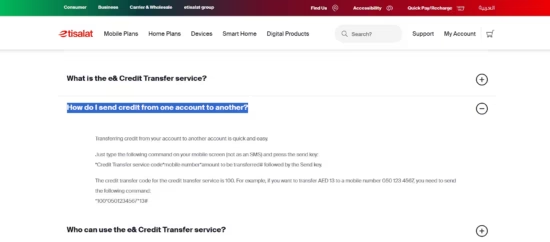
Step-by-step example of transferring Etisalat credit using the *100# service.
How to Send Etisalat Credit Using the e& UAE App?
Customers who prefer an application-based method can use the official e& UAE app.
This option is particularly convenient for people managing several mobile accounts or regularly recharging family members.
Follow these steps:
- Download or open the official e& UAE mobile app.
- Sign in using your registered account credentials.
- Select the relevant mobile account.
- Look for the credit-sharing or transfer feature, which may appear under “Share Credit and Data” or a recharge-related menu.
- Choose the option for transferring mobile credit.
- Enter the recipient’s prepaid mobile number.
- Specify the amount to transfer.
- Review the displayed transaction charges.
- Confirm the transaction and check its status.
The exact menu labels can vary between app versions.
One advantage of using the app is that customers can review account information and complete other mobile account-management activities without remembering several USSD codes.
For someone who regularly supports family members, the app may be more convenient than manually entering a transfer code.
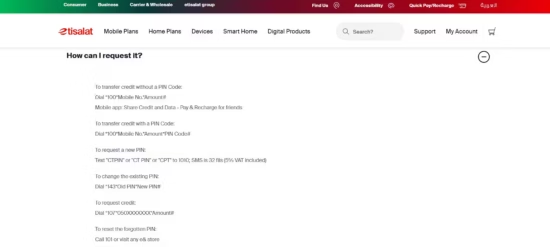
Transferring Etisalat mobile credit through the e& UAE application.
Who Can Send and Receive Credit on Etisalat?
Etisalat credit transfer eligibility depends on the sender’s account type, the recipient’s network and the status of both accounts.
| Customer Type | Can Send Credit? | Can Receive Local Credit? |
| Active Etisalat prepaid user | Yes | Yes |
| Active Etisalat postpaid user | Yes | No, under the standard prepaid-receiver service |
| Active Etisalat Wasel customer | Yes | Yes |
| Inactive or disconnected account | Generally not eligible to send | Depends on account status |
| du mobile customer | Not through the standard Etisalat local transfer service | No |
| Virgin Mobile UAE customer | Not through the standard Etisalat local transfer service | No |
The local credit transfer service is designed primarily for transfers to Etisalat prepaid accounts.
Both prepaid and eligible postpaid customers can send credit. However, a postpaid customer cannot normally receive credit into their monthly billing account using the standard local transfer method.
Do You Need to Activate Etisalat Credit Transfer?
No separate subscription is normally necessary.
The service is automatically available to eligible active Etisalat prepaid and postpaid accounts.
If your account is restricted, suspended or otherwise ineligible, the transfer may not be processed.
What Are the Etisalat Credit Transfer Charges in UAE?
Understanding the transaction charges is important because the amount deducted from the sender is greater than the credit received.
The e& UAE Data and Credit Transfer product page specifies a 5.25% transaction charge, including VAT, for local mobile credit transfers.
This means that sending AED 100 costs AED 105.25, while the recipient receives AED 100.
Etisalat Credit Transfer Fee Examples
| Credit Sent | Transaction Fee at 5.25% | Total Sender Cost |
| AED 20 | AED 1.05 | AED 21.05 |
| AED 40 | AED 2.10 | AED 42.10 |
| AED 100 | AED 5.25 | AED 105.25 |
These examples use the published VAT-inclusive rate. The actual charge and any rounding should always be checked on the transaction confirmation screen.
Some e& support material refers to a 5% service fee without separately explaining the VAT treatment. The main credit-transfer product page provides the clearer VAT-inclusive illustration.
For the latest published rates, refer to the official e& UAE credit transfer information.
Does the Recipient Pay a Transfer Fee?
Under the published local credit-transfer example, the fee is paid by the sender.
The recipient receives the amount selected for transfer.
If you send AED 20, the intended credit received is AED 20, while the sender pays the additional charge.
Is Sending Credit Cheaper Than Recharging Another Number?
Not necessarily.
Direct credit transfer is convenient when you already have sufficient transferable balance or need to share a small amount quickly.
However, paying directly for another customer’s prepaid recharge through an official recharge channel may be more cost-effective in some circumstances.
Compare the final charges rather than assuming credit transfer is the cheapest option.
What Is the Minimum and Maximum Etisalat Credit Transfer Limit?
The amount you can send is restricted by Etisalat’s transaction rules and the eligibility of your mobile account.
Etisalat Local Credit Transfer Limits
| Restriction | Standard Transfer |
| Minimum amount per transaction | AED 2 |
| Maximum amount per transaction | AED 150 |
| Daily total transfer limit | AED 150 |
| Prepaid monthly transfer limit | AED 1,500 |
| Postpaid monthly transfer limit | Confirm applicable account limit |
The official product information currently publishes AED 1,500 as the monthly maximum for both prepaid and postpaid transfers. However, a separate e& support table specifies AED 500 per month for normal postpaid transfers.
Because these official pages are inconsistent, postpaid customers should confirm their individual monthly entitlement through the e& UAE app or customer support before relying on a higher limit.
PIN-secured transfers can also have different eligibility and fair-usage conditions.
Can You Make Multiple Credit Transfers in One Day?
Yes. Standard local transfers are not necessarily restricted to one transaction per day.
For example, a customer might send AED 30 to one person and AED 40 to another on the same day.
The combined amount must remain within the applicable daily limit.
The important restriction is the total value transferred, not merely the number of transactions.
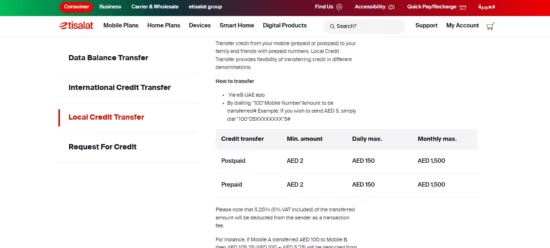
Published Etisalat daily and monthly credit transfer limits and charges.
How to Send Etisalat Credit With or Without a PIN?
Etisalat offers both standard and PIN-secured credit transfer methods.
The standard procedure generally does not require a separately registered transfer PIN.
However, customers wanting additional control over transfers can use the supported PIN functionality.
How to Send Credit Without a PIN?
Dial:
*100*MobileNumber*Amount#
For example:
*100*0501234567*20#
Follow the confirmation instructions to complete the transaction.
How to Transfer Credit With a PIN?
Customers who have configured a credit-transfer PIN can use:
*100*MobileNumber*Amount*PIN#
For example, the command structure for a transfer of AED 20 is:
*100*0501234567*20*YOURPIN#
Replace YOURPIN with the actual transfer PIN.
Do not disclose your PIN or verification codes to another person.
How to Get or Change Your Etisalat Transfer PIN?
To request a new PIN, send CTPIN to 1010.
The published charge for the PIN-request SMS is 32 fils, including VAT.
To change an existing PIN, use:
*143*OldPIN*NewPIN#
If you have forgotten the PIN, contact e& UAE customer support on 101 or visit an authorised store.
You can review the supported formats on the official Etisalat Credit Transfer support page.
How to Send Etisalat Credit Internationally?
Etisalat also offers international mobile credit transfer facilities for supported overseas prepaid networks.
This service is particularly useful for UAE residents who want to recharge a family member’s prepaid number in another country.
International transfer is different from local Etisalat-to-Etisalat balance sharing.
International Credit Transfer Using SMS
Follow these instructions:
- Open the SMS application on your phone.
- Enter the recipient’s international prepaid mobile number, including the country code.
- Send the number to 1700.
- Wait for Etisalat to return the supported recharge denominations and their AED prices.
- Select the desired recharge option.
- Review the amount charged.
- Confirm the transaction according to the SMS instructions.
- Keep the transaction confirmation until the recipient receives the recharge.
For example, an eligible Indian mobile number would be entered with country code 91, followed by the relevant national mobile number.
The recipient’s country and network must support the service.
The initial SMS to 1700 is advertised as free.
International transfers can also be initiated through the e& UAE app or supported USSD menu options.
International Transfer Limits
| Restriction | Published Limit |
| Maximum international transactions per day | 3 |
| Maximum international transactions per month | 10 |
| Maximum international transfer value per month | AED 500 |
| Minimum transaction amount | Depends on destination and available denomination |
International transfer prices depend on the country, receiving operator and recharge denomination.
The published service does not add a separate transaction fee beyond the displayed recharge price, but that price may incorporate currency conversion or operator-specific pricing.
Always review the AED amount before confirming.
Can You Send Credit From Etisalat to India, Pakistan or the Philippines?
International credit transfers may be available for supported prepaid operators in countries such as India, Pakistan and the Philippines.
However, coverage is dependent on the destination network and available recharge options.
Sending the recipient’s international number to 1700 is a practical way to check whether an eligible denomination is offered.
If your intention is to call relatives overseas rather than recharge their mobile accounts, an Etisalat international call offer may be more suitable.
How to Request Credit From Another Etisalat Number?
If you do not have sufficient prepaid balance, Etisalat provides a free service that lets eligible customers request credit from another e& UAE user.
Instead of directly receiving borrowed credit, you send a request asking someone to transfer part of their balance.
Steps to Request Etisalat Credit
- Open the phone dialler.
- Enter *107*MobileNumber*Amount#.
- Replace the number with the person you are requesting credit from.
- Specify the requested amount.
- Press the call button.
- Wait for the request notification to be delivered.
For example, to request AED 10 from 0501234567, dial:
*107*0501234567*10#
The recipient of your request can then decide whether to send the credit using the standard transfer code.
Important Conditions
The Request for Credit service is available to eligible prepaid users.
It is free to make a request, and the published limit is two requests per day.
Sending a request does not guarantee that the other person will approve it or transfer any credit.
How to Check Your Etisalat Balance Before and After Sending Credit?
Before transferring balance, it is sensible to confirm that sufficient credit is available to cover both the transfer amount and the fee.
For prepaid accounts, dial:
*121#
The response should display the relevant available balance or provide account-management options.
You can also check your balance from the e& UAE app.
After completing a transfer, check your balance again and compare it with the expected deduction.
For additional account-management instructions, see how to check your Etisalat balance.
Remember that your main prepaid balance is not necessarily the same as your remaining internet allowance.
Customers who want to confirm their MB or GB balance can use the relevant Etisalat data check codes instead.
Why Is My Etisalat Credit Transfer Not Working?
Credit transfers can fail because of insufficient funds, incorrect account details, exceeded limits or temporary technical problems.
Identifying the reason can prevent repeated unsuccessful attempts.
1. Insufficient Transferable Balance
One common reason for a failed transfer is having enough balance for the requested credit amount but not enough to cover the associated transaction fee.
For example, attempting to send AED 100 with exactly AED 100 available may fail because the sender must also pay the transfer charge.
Solution: Check the available transferable balance and ensure it covers the final transaction cost.
2. Incorrect Recipient Number
Entering the wrong mobile number can cause a failed transaction or result in credit being transferred to someone else.
Solution: Verify the complete mobile number before confirming. Avoid relying on an unfamiliar number copied from an old message.
3. Recipient Uses Another Network
Local Etisalat credit transfers are intended for eligible Etisalat prepaid accounts.
Sending the standard credit-transfer command to a du or Virgin Mobile number will not provide the same cross-network transfer functionality.
Solution: Use an appropriate prepaid recharge method for the recipient’s network.
4. Daily or Monthly Limit Reached
If your transfer exceeds the applicable daily or monthly allowance, the network may reject it.
Solution: Check your recent transfers and account restrictions. A transfer that exceeds the daily limit may need to be postponed until the applicable allowance resets.
5. Incorrect USSD Code
A missing asterisk, incorrect number or misplaced hash character may prevent the command from working.
Solution: Use the complete structure:
*100*MobileNumber*Amount#
Do not send the local credit-transfer command as an ordinary SMS.
6. Network or USSD Session Error
A temporary connectivity problem may prevent the network from processing the command.
Solution: Check your mobile signal, confirm the correct SIM is selected and retry only after checking whether the first request was processed.
If the USSD service continues to fail, try the official app.
7. Account Restrictions
A temporarily disconnected, suspended or ineligible account may not be permitted to send credit.
Solution: Check the account status in the e& UAE app or contact customer care.
8. Credit Deducted but Recipient Did Not Receive It
This requires particular attention.
Do not immediately repeat the transaction because the first credit transfer may still be processing.
Check both accounts and retain the confirmation message.
If the balance has been deducted but the recipient did not receive it, call 101 from an eligible e& UAE line and request an investigation.
Etisalat’s published support information says that an amount may be restored where an investigation establishes an e& system failure.
Can You Reverse an Etisalat Credit Transfer?
Ordinary completed Etisalat credit transfers are generally non-refundable.
Once the transaction has been confirmed and the recipient account has received the credit, customers should not assume that customer service can reverse the transfer.
This is why checking the mobile number and transfer amount before pressing the confirmation option is essential.
A technical failure is different from a successful transfer to the wrong number. If the network deducted credit but failed to deliver it, contact support for an investigation.
What Is the Difference Between Sending, Requesting and Borrowing Etisalat Credit?
Although these services are often grouped together, they perform different functions.
| Feature | How It Works | Main Code |
| Send Credit | Transfer eligible balance to another prepaid number | *100*Number*Amount# |
| Request Credit | Ask another e& user to transfer credit to you | *107*Number*Amount# |
| Reserve Credit | Obtain eligible emergency credit from the operator | *108*1# |
| International Credit Transfer | Recharge supported overseas prepaid numbers | SMS international number to 1700 |
Can You Borrow Credit Instead of Requesting It?
Yes, eligible prepaid customers can use Etisalat Reserve Credit.
The official service allows qualifying customers to access emergency mobile credit of up to AED 50, depending on eligibility.
The published eligibility requirements include at least three months as a prepaid customer and usage of at least AED 10 per month.
The Reserve Credit activation code is:
*108*1#
Credit advanced through the service is recovered from a subsequent recharge according to the applicable service terms.
This should not be confused with transferring balance to another customer.
For more information about emergency mobile balance options, read how to borrow credit from Etisalat.
Is Etisalat Credit Transfer Safe?
The official Etisalat credit transfer service uses account-based commands and a transaction confirmation process.
However, users must still take precautions against incorrect transfers and fraudulent requests.
Before sending credit:
- Confirm the recipient’s identity and mobile number.
- Check that the recipient has actually requested the credit.
- Review the transaction amount and fees.
- Never share your transfer PIN or account OTP.
- Avoid transferring credit in response to suspicious calls or messages.
- Use the official e& UAE app and recognised service codes.
- Keep the transaction confirmation when sending larger amounts.
Fraudsters may impersonate relatives, friends or service representatives to request urgent mobile credit.
If an unexpected request arrives, contact the supposed recipient through a trusted channel before transferring funds.
Which Is the Best Way to Send Etisalat Credit?
The most suitable method depends on the purpose of the transaction.
For a quick transfer to a local Etisalat prepaid customer, the USSD code is generally the simplest option.
For customers who prefer to view their mobile account, manage several services or avoid manually typing commands, the e& UAE app provides another convenient choice.
When transferring credit overseas, the international SMS service or the app is more appropriate.
If the recipient simply needs a top-up and the sender does not need to use their own prepaid balance, comparing the cost of direct recharge is sensible.
For households managing several mobile lines, keeping a record of transfers and charges can also help avoid unnecessary spending.
Conclusion
Learning how to send credit Etisalat is straightforward once you understand the correct code and transfer requirements.
For local credit transfers, dial *100*MobileNumber*Amount#, verify the recipient’s number and confirm the transaction. Eligible prepaid and postpaid customers can send mobile credit to supported Etisalat prepaid accounts, subject to applicable limits.
The published local transfer fee is 5.25%, including VAT, on the main e& UAE service page. Customers should always check the final charge and available transfer allowance before confirming.
For other situations, Etisalat provides international prepaid recharge through 1700, a free Request for Credit facility and emergency Reserve Credit for qualifying users.
Selecting the right service and checking the transaction details carefully can help ensure that credit reaches the intended recipient without avoidable costs or complications.
Frequently Asked Questions
1. How do I send AED 10 credit from Etisalat to Etisalat?
Dial *100*0501234567*10#, replacing the example number with the recipient’s actual Etisalat prepaid number. Press the call button and follow the confirmation instructions.
2. What is the Etisalat credit transfer code in UAE?
The standard local transfer code is *100*MobileNumber*Amount#. It is entered through the phone dialler rather than sent as an SMS.
3. Can I send Etisalat credit without internet?
Yes. The USSD credit transfer service works over the mobile network without requiring a mobile internet connection.
4. Can a postpaid Etisalat customer transfer credit?
Yes. Eligible postpaid customers can transfer credit to Etisalat prepaid users, subject to their account limits and applicable charges.
5. What is the minimum Etisalat credit transfer amount?
The published minimum local transfer amount is AED 2 per transaction.
6. Can I send Etisalat credit to a du number?
Not through the standard local Etisalat credit transfer service. Consider a supported direct recharge method for the recipient’s mobile network.
7. How can I request credit from another Etisalat user?
Dial *107*MobileNumber*Amount# to send a credit request. Eligible prepaid users can make up to two requests per day.
8. How do I transfer Etisalat credit internationally?
Send the recipient’s international prepaid number, including the country code, by SMS to 1700. Follow the returned instructions and confirm an available recharge denomination.
9. Can I transfer promotional or bonus Etisalat credit?
Do not assume promotional, borrowed or bonus credit is transferable. Its usability depends on the specific balance type and offer conditions. Check the eligible balance before attempting a transfer.
10. What should I do if transferred credit does not arrive?
Check the transaction status and the recipient’s balance. If the credit was deducted but not delivered, contact e& UAE customer care on 101 for assistance.