Last Updated: 04.04.2026
If you live in the UAE but manage a home, office, or family property in Pakistan, keeping track of electricity bills can feel difficult. What happens if the paper bill never arrives, or someone forgets to send you a copy?
In 2026, the easiest solution is to use the online bill check IESCO system. It allows you to view your latest electricity bill, download a duplicate copy, and even pay it without visiting Pakistan.
Whether your connection is in Islamabad, Rawalpindi, Attock, Jhelum, or Chakwal, you only need a reference number or customer ID to access your bill in minutes. The process is simple, works 24/7, and helps you avoid late payment charges. Most importantly, it gives you complete control over your electricity account from anywhere in the world.
What Is IESCO Online Bill Check and Why Is It Useful?
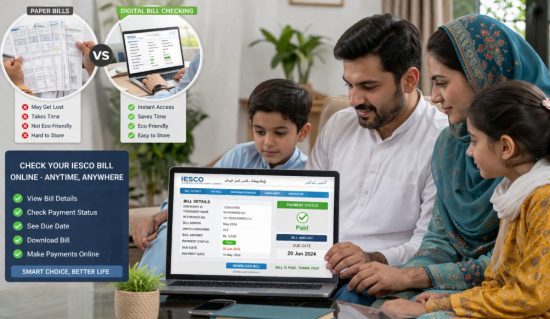
IESCO online bill check is a digital service provided for consumers of Islamabad Electric Supply Company. Instead of waiting for a paper bill, you can check your electricity bill online through the official IESCO or PITC portal. The system works for customers in Islamabad, Rawalpindi, Attock, Jhelum, Chakwal, Gujar Khan, and nearby areas covered by IESCO.
The service is useful because it helps you:
- View your latest electricity bill instantly
- Download a duplicate copy if the original bill is lost
- Print the bill for payment or record-keeping
- Check previous bills and compare usage
- Access your bill at any time, even from another country
Many overseas Pakistanis living in the UAE use this option to manage utility bills for their homes in Pakistan.
One Rawalpindi resident explained the convenience perfectly:
“The portal is open 24/7 and saves time. You do not need to stand in a queue or wait for the paper bill. You can simply check the bill whenever you want.”
That is exactly why online bill check IESCO has become the preferred method for most consumers today.
How Can You Check Your IESCO Bill Online by Reference Number?
Checking your IESCO bill online by reference number is the quickest and most common method. Every IESCO bill includes a unique 14-digit reference number. Once you enter that number on the official portal, your latest bill appears instantly.
To check your bill, follow these steps:
- Visit the official IESCO or PITC bill portal
- Find the 14-digit reference number on an old bill copy
- Enter the number carefully without spaces
- Click the “Search” or “View Bill” button
- Wait a few seconds for your bill details to load
- Download or print the bill if needed
The reference number is usually printed near the top left or top right section of your previous electricity bill. If you enter even one wrong digit, the system will not show your account, so it is important to type it exactly as printed.
A customer from Islamabad described the process this way:
“I found my old bill, entered the 14-digit number, and the current bill appeared immediately. It only took a minute, and I downloaded the PDF right away.”
For most users, this is the fastest way to complete an online bill check IESCO search from home or abroad.
Can You Check an IESCO Bill Online Using a Customer ID?
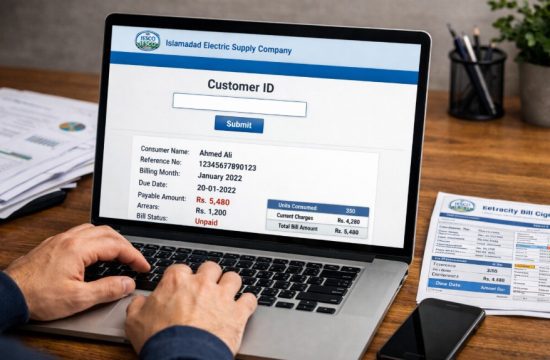
Yes, you can also check an IESCO bill online by using your Customer ID. This is helpful if you do not have the 14-digit reference number available. The Customer ID is usually a 10-digit number printed on your bill, and it stays the same for your connection even when new bills are generated each month.
To use a Customer ID, open the IESCO bill portal and choose the field marked “Customer ID” or “Consumer ID.” Enter the number exactly as shown on your bill and click search. Your current bill will appear, and in many cases you can also view old bills and payment history. This method is especially useful if your reference number changes or if you only have a saved photo of an older bill.
Where Can You Find the Customer ID on Your Electricity Bill?
The Customer ID is printed on the upper section of your electricity bill. It is usually near the reference number and customer details. On many IESCO bills, you will see it in the top left area directly above or beside the reference number.
You can find it in these places:
- On the top portion of your latest paper bill
- On an older duplicate bill PDF
- Inside a screenshot or photo of your bill
- In your bill history if you previously saved the document
The Customer ID normally contains 10 digits. Unlike the reference number, which can differ depending on the billing cycle, this number remains linked to your electricity connection permanently.
If you have family members in Pakistan, ask them to send a photo of the upper part of the bill. That section almost always contains both the Customer ID and the reference number.
What Is the Difference Between a Customer ID and a Reference Number?
Many people confuse the Customer ID with the reference number, but they are not the same.
| Feature | Customer ID | Reference Number |
|---|---|---|
| Length | Usually 10 digits | Usually 14 digits |
| Purpose | Identifies your account permanently | Identifies a specific bill |
| Changes Every Month? | No | Sometimes |
| Used for Online Bill Check? | Yes | Yes |
| Printed on Bill? | Yes | Yes |
The Customer ID works like your permanent electricity account number. It remains connected to your property or meter. The reference number is tied to each billing cycle and helps the system locate your current bill faster.
For example, if you live in the UAE and manage a family house in Islamabad, you may keep only one saved Customer ID on your phone. Every month, you can enter that same ID and check the latest bill without asking anyone in Pakistan to send you the new reference number.
Some users prefer the Customer ID because it is easier to remember. Others use the reference number because it appears more clearly on the bill. Both methods work, so you can choose whichever one is easier for you.
How Can You Download, Save, and Print an IESCO Duplicate Bill?
Once your bill appears on the screen, you can easily save it as a duplicate bill. The duplicate copy is accepted everywhere, including banks, mobile apps, and payment centers.
After opening your bill:
- Click the “Download” button to save the bill as a PDF
- Use the “Print” option if you need a paper copy
- Save the PDF to your phone, laptop, or cloud storage
- Share the file with family members through WhatsApp or email
A duplicate bill is useful if:
- The original paper bill was lost
- You did not receive the bill at home
- You want to send the bill to someone in another city
- You need proof of payment or record-keeping
Many people in the UAE save their IESCO duplicate bill in a separate folder every month. That makes it easier to compare electricity usage and due dates later. The duplicate PDF has the same details as the original bill, including the amount, billing month, due date, and reference number.
Why Is CNIC-Based IESCO Bill Checking Not Available?
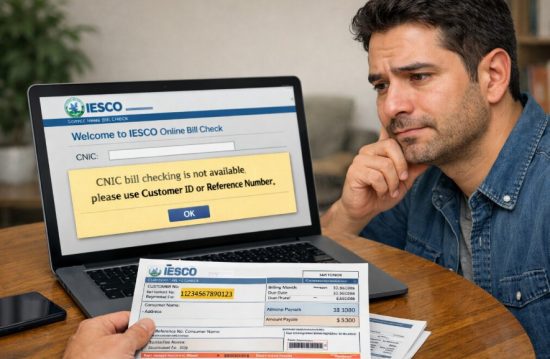
Many people expect to check their electricity bill by entering a CNIC number, but IESCO does not currently offer that option. The official system only allows bill access through a 14-digit reference number or a 10-digit Customer ID. This policy exists to protect customer privacy and reduce the risk of unauthorized access.
If bills could be searched through CNIC alone, anyone who knows your identification number could potentially see your electricity account details. Since a CNIC may be shared across different services and documents, IESCO keeps its billing system separate and more secure.
Which Details Do You Need Instead of a CNIC?
Instead of using a CNIC, you need one of the following details:
- The 14-digit reference number printed on the bill
- The 10-digit Customer ID or Consumer ID
- A previous digital copy of your bill
- A screenshot or photo of the upper section of the bill
These details are enough to open your latest bill, check the amount due, and download a duplicate copy.
One IESCO support explanation makes this clear:
“Bills can only be accessed using your Reference Number or Customer ID. These numbers are on the right side of your physical bill copy.”
That is why even if you know the account holder’s CNIC, the system will still ask for the reference number or Customer ID before showing the bill.
What Should You Do If You Cannot Find Your Reference Number?
If you cannot find your reference number, there are still several ways to recover it.
You can try these methods:
- Look at an older bill saved in your phone or email
- Check previous WhatsApp messages where a family member may have shared the bill
- Use your Customer ID instead
- Contact the nearest IESCO office or helpline
- Ask someone at the property to send a picture of the old bill
In many cases, the number is available on the upper section of any previous bill copy. If you have even one old PDF, you can continue checking future bills without any difficulty. Some users also keep a screenshot of the bill details in their phone notes so they never lose the number again.
How Can You Pay Your IESCO Bill Online Without Visiting an Office?
After checking your bill, you can pay it online without going to a bank or IESCO office. This is especially helpful for people living in the UAE who need to pay a family member’s electricity bill in Pakistan.
IESCO bills can be paid through:
- Internet banking from Pakistani banks
- Mobile banking apps such as Meezan, MCB, HBL, and Allied Bank
- Easypaisa, JazzCash, and Nayapay
- ATM machines
- Utility payment sections in banking apps
The payment process is simple:
- Open your bank or wallet app
- Select “Utility Bills” or “Electricity Bill”
- Choose IESCO from the list
- Enter the reference number or Customer ID
- Confirm the amount and submit payment
Once the payment is successful, save the confirmation message or screenshot. That can help if there is ever a delay in updating the payment status. Most digital payments are reflected within a few hours.
What Information Can You Understand From Your IESCO Electricity Bill?
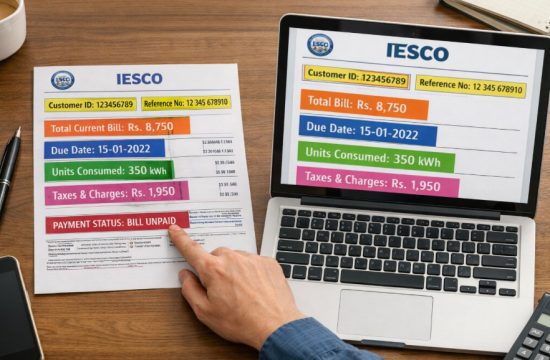
Your IESCO bill contains more than just the amount you need to pay. It also shows your electricity usage, dates, taxes, and meter details. Understanding these sections can help you avoid mistakes, reduce your bill, and identify unusual charges.
The main sections usually include:
- Customer name and address
- Customer ID and reference number
- Meter number and meter reading
- Billing month
- Units consumed
- Amount due
- Due date
- Taxes and extra charges
If you notice that your bill suddenly increases, the first thing to check is the number of units consumed. Compare it with previous months to see whether the increase came from higher electricity usage or from added taxes.
What Do the Meter Reading, Issue Date, and Due Date Mean?
The meter reading section shows how much electricity was used during the month. It compares the previous meter reading with the current one and calculates the total units consumed.
For example:
| Detail | Meaning |
|---|---|
| Previous Reading | Last month’s meter number |
| Current Reading | This month’s meter number |
| Units Used | Difference between the two readings |
| Issue Date | Date when the bill was generated |
| Due Date | Last date to pay without late charges |
If your current reading is much higher than expected, it may mean that you used more appliances, ran the air conditioner longer, or there was an error in the reading.
The issue date tells you when the bill was created. The due date is important because late payment often adds extra charges. Always try to pay before the due date, especially if you are managing the account from abroad.
Some consumers in Rawalpindi say they did not realize how useful these dates were until they missed a payment.
One resident explained:
“I always looked only at the amount due. Later I noticed the issue date and due date, and it became much easier to pay the bill on time and avoid extra charges.”
That is why checking these details every month is important, even if you pay the bill automatically.
Which Taxes and Charges Are Included in an IESCO Bill?
Your IESCO bill also contains several taxes and service charges. These can make the total amount much higher than the actual electricity units you used.
Common charges may include:
- Electricity duty
- Fuel price adjustment
- GST
- TV fee
- Quarterly tariff adjustment
- Fixed charges
- Meter rent in some cases
These charges are listed separately in the lower section of the bill. If your total bill seems unusually high, compare the taxes and fuel adjustment section with previous months. Sometimes the electricity usage remains the same, but the bill increases because of a new tariff or fuel cost adjustment.
For example, if your home used 250 units in both January and February, the February bill could still be higher because of changes in the fuel adjustment or tax rate.
To understand the charges better:
- Compare this month’s bill with the previous month
- Check whether your unit consumption changed
- Look for any new adjustment or surcharge
- Contact IESCO support if the numbers do not seem correct
By reading these details carefully, you can better understand where your money is going and whether there is a billing issue that needs attention.
What Should You Do If Your IESCO Bill Is Not Showing Online?
Sometimes the bill may not appear even after entering the reference number. This usually happens because the number was entered incorrectly, the latest bill has not yet been uploaded, or there is a temporary website issue.
If your bill is not showing, try these steps:
- Check that you entered all digits correctly
- Remove any extra spaces before or after the number
- Try using your Customer ID instead of the reference number
- Refresh the page or try another browser
- Wait a few hours if the new bill was just issued
- Contact IESCO support if the problem continues
In many cases, the bill becomes available one or two days after the official billing date. If you repeatedly face this issue, save both your Customer ID and reference number in a secure place so you always have another option available.
How Can You Reduce Your IESCO Electricity Bill and Get Help From IESCO Support?
The easiest way to reduce your electricity bill is to use less electricity during peak hours and avoid leaving appliances running when they are not needed. Even small changes can make a noticeable difference over time.
You can lower your bill by:
- Turning off lights and fans when not in use
- Keeping your air conditioner at 26°C
- Using natural daylight during the day
- Switching off devices instead of leaving them on standby
- Monitoring your meter reading every month
If you still believe your bill is incorrect, you can contact IESCO support through its helpline, SMS service, or email. The main helpline numbers are 118 and 051-9252937. You can also send an SMS to 8118 or contact the customer care team by email.
IESCO support can help if:
- Your bill amount looks wrong
- Your bill is missing online
- You need a new reference number
- You want to report a power issue or complaint
Managing your online bill check IESCO account regularly helps you stay informed, avoid late charges, and keep control of your electricity costs no matter where you live.
Conclusion
Using the online bill check IESCO system is the easiest way to stay updated about your electricity account, especially if you live in the UAE and manage a property in Pakistan. You can quickly check your latest bill, download a duplicate copy, pay it online, and review important details such as meter readings, due dates, and taxes.
Even if you do not have your paper bill, the reference number or Customer ID can help you access everything within minutes. The process is available all day, every day, and saves you from delays, missed payments, and unnecessary visits to an office.
By checking your bill regularly and understanding the information on it, you can control your electricity costs and avoid unexpected charges in the future while maintaining better records for your family, home, or business needs.
FAQs
Can you check an IESCO bill without a previous bill copy?
Yes, you can still check your bill if you know your Customer ID. If you do not have that either, you may need to contact IESCO support or ask someone at the property to share an older bill copy.
How long does it take for a new IESCO bill to appear online?
A new IESCO bill usually appears online within 24 to 48 hours after it is issued. If it is not visible yet, wait a little longer and try again later.
Is the IESCO duplicate bill accepted for payment?
Yes, the duplicate bill has the same details as the original paper bill. You can use it to pay through banks, mobile apps, ATMs, and digital wallets.
Can you check more than one IESCO bill from the same device?
Yes, you can check multiple bills from the same phone or computer. You only need to enter a different reference number or Customer ID for each account.
What should you do if your IESCO bill shows the wrong amount?
First, compare the current bill with the previous month’s bill to check changes in units or taxes. If the amount still seems incorrect, contact IESCO customer support for assistance.
Can you use a mobile phone to check and download an IESCO bill?
Yes, the IESCO bill portal works on mobile phones as well as computers. You can view, download, and save the bill PDF directly to your phone.
What happens if you pay your IESCO bill after the due date?
If you pay after the due date, IESCO may add a late payment surcharge to the bill. Delayed payments for several months can also create service issues or disconnection notices.