Last Update – 23-10-2026
If your Etisalat prepaid balance keeps decreasing even when you are not making calls or using much mobile data, an active subscription could be responsible. Daily entertainment services, automatically renewing data bundles, caller tunes and third-party content subscriptions can deduct money from your prepaid credit.
Fortunately, Etisalat, now operating under the e& UAE brand, provides several methods for managing and cancelling these services.
To cancel all unwanted subscriptions on Etisalat prepaid, open the e& UAE app, review your active add-ons and cancel them individually. You can also dial 101 to ask customer support to identify and deactivate recurring services on your number. Certain packages have their own USSD or SMS cancellation codes.
There is no single publicly verified USSD code that guarantees cancellation of every Etisalat prepaid subscription. The correct method depends on the services attached to your account.
This guide explains how to find active subscriptions, deactivate unwanted packages, stop automatic renewals and prevent unexpected deductions without cancelling your prepaid SIM.
How Can You Check All Active Subscriptions on Etisalat Prepaid?
Before cancelling anything, identify the services currently active on your mobile number. This prevents you from accidentally removing an essential internet or calling package.
Some prepaid users have several subscriptions running simultaneously. For example, they may have a monthly mobile data plan, a weekly entertainment package and an additional calling service.
You can check your subscriptions using the following methods.
1. Check Through the e& UAE App
The e& UAE app is generally the most convenient option because it allows you to review and manage eligible services from your phone.
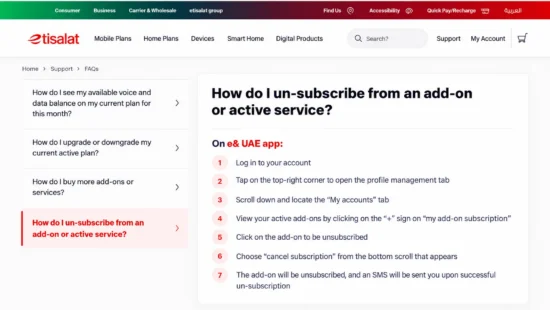
Official e& UAE instructions for cancelling an active add-on through the e& UAE app.
Follow these steps:
- Open the e& UAE app and sign in with your registered mobile number.
- Select the prepaid account you want to manage.
- Open the account or profile management section.
- Navigate to My Accounts.
- Look for the active add-ons or subscription section.
- Expand the subscription details to identify your current packages.
- Review any displayed charges, renewal dates and cancellation options.
The precise menu names may vary with app updates and the type of prepaid account.
According to the official e& UAE prepaid account management instructions, eligible add-ons can be selected and cancelled directly through the app, with an SMS confirmation following successful deactivation.
2. Check Using USSD Codes
Etisalat provides different shortcodes for managing prepaid accounts and packages.
| USSD Code | Main Purpose |
| *101# | Access supported prepaid package and service-management options |
| *170# | Access mobile data-related information and options |
| *121# | Check the available prepaid credit balance |
| *170*6# | Access Monthly Combo pack management and deactivation |
These codes do not perform the same function. In particular, checking a balance is not the same as checking every paid subscription.
For additional information about prepaid balances and internet allowances, see how to check your Etisalat balance.
3. Contact Etisalat Customer Care
If you cannot identify the subscriptions yourself, call 101 from your Etisalat number.
Ask the representative to check for:
- Active prepaid data and calling bundles.
- Daily, weekly and monthly auto-renewing packages.
- Premium SMS and entertainment subscriptions.
- Third-party content services charged to your prepaid balance.
- Any other recurring deductions associated with your mobile number.
Customer support can help distinguish ordinary call or data usage from subscription-related charges.
How to Cancel All Subscriptions on Etisalat Prepaid?
There are four main approaches to cancelling unwanted prepaid subscriptions. The appropriate method depends on whether the subscription is an Etisalat package, a digital content service or a third-party product.
Method 1: Cancel Etisalat Subscriptions Through the e& UAE App
For most users, this is the best place to begin.
Step 1: Open the e& UAE App
Launch the official e& UAE application on your smartphone and log in to the account linked to your prepaid SIM.
Step 2: Access Your Account
Open the profile management area and select My Accounts.
If several mobile numbers are registered under your account, make sure you choose the correct prepaid number.
Step 3: Find Active Add-Ons
Expand the section showing your active add-on subscriptions.
Check the names and details of the services currently attached to your account.
Step 4: Select a Subscription
Choose the package you no longer need.
Where supported, a cancellation option will appear after selecting the service.
Step 5: Confirm Cancellation
Select Cancel Subscription and follow the confirmation instructions.
Step 6: Repeat for Other Services
If you want to remove multiple subscriptions, repeat the cancellation process for each unwanted package.
Step 7: Check the Confirmation SMS
After successful deactivation, e& normally sends an SMS confirmation for supported add-ons.
Keep this message as evidence that the cancellation was completed.
Importantly, some third-party digital subscriptions may appear in a different purchase-management area from ordinary data add-ons. Check both if your balance continues to decrease.
Method 2: Cancel Subscriptions Using Etisalat USSD Codes
USSD codes are useful when you do not have mobile internet access or cannot log in to the app.
However, the correct deactivation code depends on the subscription.
Cancelling Monthly Combo Packs
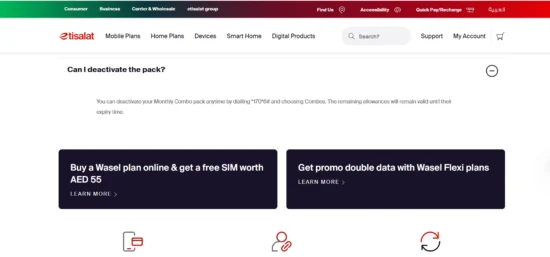
e& UAE confirms that Monthly Combo packs can be deactivated by dialling 1706# and selecting Combos
For eligible Etisalat Monthly Combo packages:
- Open your phone’s dialler.
- Enter *170*6#.
- Press the call button.
- Choose the Combos option.
- Select the relevant package and follow the deactivation instructions.
- Confirm the request and check for a response.
Under the published Monthly Combo conditions, remaining allowances continue until their scheduled expiry after deactivation.
Cancelling WaselGo Weekly Plans
For eligible WaselGo weekly prepaid plans, dial *101# and follow the available plan-management options to deactivate the weekly package.
Do not select a new plan unless you intend to replace your existing subscription.
Important: Codes such as *101# are service-management menus, not universal commands to cancel every paid subscription on your mobile number.
Method 3: Cancel Etisalat Subscriptions Through SMS
Some Etisalat subscriptions can be cancelled by sending a specific SMS keyword to a designated service number.
Unlike the mobile app, SMS cancellation generally requires knowing exactly which package you have subscribed to.
Here are examples of service-specific cancellation instructions published by e& UAE.
| Subscription | Cancellation Method | Applies To |
| Mobile Internet Calling Plan | Send CCP to 1012 | Eligible Internet Calling Plan subscriptions |
| Pinoy Pack | Send cPinoy to 1012 | Eligible Pinoy Pack subscriptions |
| Monthly Combo Pack | Dial *170*6# and select Combos | Eligible prepaid Monthly Combo packages |
| WaselGo Weekly Plan | Dial *101# and follow plan options | Eligible WaselGo weekly subscriptions |
These instructions apply only to the corresponding packages.
For example, sending CCP is intended to cancel the relevant Internet Calling Plan. It does not cancel unrelated data bundles or entertainment subscriptions.
Avoid relying on generic instructions such as sending STOP ALL to 1012 without confirmation that the command is supported for your specific service.
If you received an activation SMS containing a dedicated cancellation keyword, follow that service’s published instructions or confirm the keyword with e& customer support.
Method 4: Cancel Everything Unwanted Through Etisalat Customer Care
If you have several subscriptions or cannot identify the reason for recurring deductions, speaking with customer support may be more effective than trying different codes.
Dial 101 from your Etisalat mobile number.
Once connected, explain that you want a review of all paid and automatically renewing services on your prepaid account.
You can request the following:
- A list of active paid subscriptions.
- The name and renewal frequency of each service.
- Cancellation of every unwanted recurring package.
- A check for third-party content subscriptions.
- Available restrictions against future premium or third-party charges.
- Confirmation that recurring deductions have been stopped.
Before ending the call, ask for a confirmation message or service request reference number.
Customer support may need to verify your identity before changing account settings.
For users cancelling a broader range of services, our explanation of how to deactivate services in Etisalat UAE also covers different service categories.
How Can You Cancel Third-Party Subscriptions on Etisalat?
Third-party subscriptions can be more difficult to identify than ordinary mobile packages.
These are digital services provided by another company but charged through your Etisalat mobile account.
Examples include entertainment subscriptions, online games, music services, digital content packages and certain premium services.
Some products use direct carrier billing, meaning the subscription fee is deducted from your prepaid balance rather than from a bank card.
To find and cancel these services:
- Open the e& UAE app.
- Select your prepaid mobile account.
- Review your purchases, digital services or subscription-management options.
- Identify any unfamiliar recurring digital purchases.
- Select the service and use the available cancellation option.
- Check whether the service has stopped renewing.
e& provides management options for eligible digital purchases and subscriptions through its mobile app and online account services.
If an unfamiliar service is not visible in the app, contact 101 and request a review of third-party billing activity.
Ask whether a spending limit or suitable restriction on third-party purchases can be applied to your number.
Remember that subscriptions paid directly through Apple, Google or a separate bank card may need to be cancelled through the relevant provider instead. Removing an e& mobile add-on will not necessarily cancel them.
How Do You Stop Etisalat Auto-Renewal on Prepaid?
Automatic renewal means that a subscription attempts to renew at the end of its validity period without requiring a new purchase each time.
This is common with weekly and monthly bundles.
An auto-renewing package may continue deducting money from your prepaid balance whenever the relevant renewal conditions are met.
To stop renewal, identify the active package and use its own deactivation option.
When reviewing the package, check:
- Whether it renews automatically.
- The next scheduled renewal date.
- The amount charged per renewal.
- Whether cancellation takes effect immediately or at the end of the validity period.
- Whether unused data or calling minutes remain available.
There is an important difference between turning off renewal and immediately terminating a service.
Some subscriptions allow you to use remaining benefits until expiry. Others stop immediately and do not refund unused allowances.
For example, e& states that eligible Monthly Combo allowances remain available until expiry following deactivation, while its published Mobile Internet Calling Plan instructions provide for immediate cancellation without a refund.
Always confirm the rules for your own package before proceeding.
Why Is Your Etisalat Prepaid Balance Decreasing Without Using Mobile Data?
Recurring subscriptions are one possible explanation, but they are not the only reason a prepaid balance may decrease.
Unexpected deductions can also result from mobile data usage outside an active bundle, chargeable calls, SMS messages, roaming or other services.
The following table can help identify possible causes.
| What You Notice | Possible Reason | What to Check |
| Balance decreases every day | Daily subscription or chargeable usage | Active daily services and usage records |
| Credit decreases approximately every week | Weekly renewing package | Weekly add-ons and third-party subscriptions |
| A larger amount disappears periodically | Monthly automatic renewal | Monthly data, calling and entertainment plans |
| Charges appear after opening promotional content | Possible third-party service activation | Digital subscriptions and activation SMS messages |
| Balance falls while travelling | Roaming usage or roaming package renewal | International roaming settings and charges |
| Credit decreases during ordinary browsing | Data usage outside an active allowance | Data balance and usage history |
Before reporting a deduction, compare the available credit with recent calls, messages and mobile data usage.
You can use the Etisalat data check code to understand the difference between your remaining internet allowance and your main prepaid credit.
This helps establish whether the problem comes from an unwanted recurring subscription or ordinary mobile usage.
What Should You Do if Etisalat Subscriptions Continue Charging After Cancellation?
If money continues to be deducted after you have cancelled a service, first check that the cancellation was completed successfully.
A cancellation request and a confirmed deactivation are not always the same thing.
Step 1: Check the Confirmation
Look for an SMS or in-app message confirming that the subscription has been cancelled.
If you only received a message stating that a request was submitted, verify its final status.
Step 2: Review Active Services Again
Open the e& UAE app and check whether the service still appears as active.
Where possible, distinguish between a package remaining usable until expiry and a package still scheduled to renew.
Step 3: Identify the New Deduction
Compare your balance and usage records to determine whether the recent charge belongs to the cancelled service or another subscription.
Step 4: Raise a Complaint With Etisalat
Call 101 and provide:
- Your registered mobile number.
- The subscription name, if known.
- The date you requested cancellation.
- The confirmation SMS or reference number.
- Details of subsequent deductions.
- The amount you believe was charged incorrectly.
Ask for an investigation, cancellation confirmation and a refund review where appropriate.
Step 5: Escalate an Unresolved Dispute
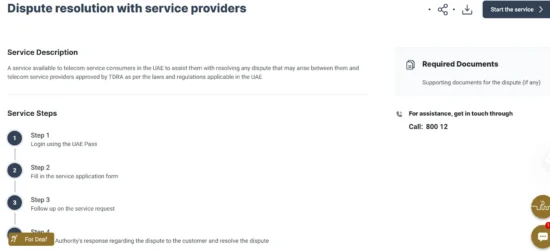
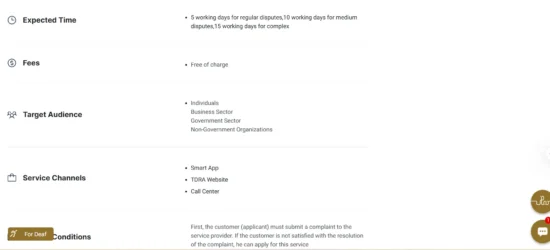
TDRA states that telecom customers should first complain to their service provider before escalating an unresolved dispute to the regulator.
If you have already complained to Etisalat and are dissatisfied with the response, you can use the UAE Telecommunications and Digital Government Regulatory Authority’s Dispute Resolution with Service Providers service.
The regulator requires customers to raise the issue with their telecom provider first.
Keep your complaint reference number and supporting evidence when escalating a dispute.
Can You Get a Refund After Cancelling an Etisalat Subscription?
A refund is not automatic when you cancel a subscription.
The outcome depends on the service conditions, when the charge occurred and whether it was authorised.
For example, cancelling a package halfway through its validity period does not necessarily entitle you to a refund for unused benefits.
However, if you believe a subscription was activated without your permission or continued charging after its confirmed cancellation, you can ask e& to investigate.
Explain the reason for your refund request and provide the relevant transaction details.
A useful complaint should identify the disputed charge, the service involved, why you believe it is incorrect and what resolution you are requesting.
Do not assume that simply deleting an application or removing a SIM card cancels a paid mobile subscription.
How Can You Prevent Unwanted Etisalat Subscriptions in the Future?
Cancelling unnecessary services is only the first step. Reviewing how subscriptions are activated can help prevent recurring deductions.
Consider these precautions:
- Review your subscriptions regularly: Check paid add-ons and digital purchases through the e& UAE app.
- Read activation messages: Confirm the subscription price, renewal frequency and cancellation instructions before subscribing.
- Avoid suspicious promotional links: Do not enter an SMS verification code into an unfamiliar subscription website.
- Check free-trial conditions: Some trials become paid subscriptions after the promotional period ends.
- Ask about third-party spending controls: Contact customer care to find out which restrictions are available for your account.
- Monitor your prepaid credit: Compare unexpected deductions with your recent mobile usage and active packages.
- Keep cancellation records: Retain the confirmation SMS until you have verified that further renewal charges have stopped.
If you use your prepaid number for business calls, customer enquiries or banking verification, be particularly careful not to cancel the underlying mobile line while trying to remove paid add-ons.
Will Cancelling All Subscriptions Deactivate Your Etisalat SIM?
No. Cancelling optional subscriptions does not normally deactivate your main prepaid mobile number.
Your prepaid line and its associated bundles are different services.
You can generally remove an entertainment subscription, calling add-on or renewing data package while keeping your Etisalat number active.
However, cancelling your main tariff, migrating to another plan or terminating your mobile account may have different consequences.
For comparison, cancelling an Etisalat postpaid plan online can involve account closure procedures and contractual considerations that do not ordinarily apply when simply removing prepaid add-ons.
If your goal is to retain your SIM but stop recurring deductions, tell customer support that you want to cancel paid subscriptions rather than close the mobile account.
How Can You Confirm That All Unwanted Subscriptions Have Been Cancelled?
After completing the cancellation process, perform a final account review.
First, open the e& UAE app and check your active add-ons. Ensure that the unwanted subscriptions no longer show as scheduled for renewal.
Next, review any third-party digital subscriptions associated with carrier billing.
Check your SMS messages for successful cancellation confirmations.
Finally, monitor your prepaid balance, particularly around the dates when the cancelled services previously renewed.
If you continue to notice unexplained charges, request an itemised explanation from e& rather than repeatedly attempting unrelated cancellation codes.
The aim is not simply to remove services from an app screen. It is to confirm that the relevant recurring charges have actually stopped.
Conclusion
Learning how to cancel all subscriptions on Etisalat prepaid is particularly useful when recurring charges reduce your available mobile credit.
The safest approach is to review your account in the e& UAE app, identify unwanted packages and deactivate each one through its supported cancellation method. For services that cannot be found or cancelled online, Etisalat customer care on 101 can help investigate the account.
Avoid assuming that one USSD code or SMS keyword will remove every subscription. Etisalat data bundles, weekly plans, entertainment services and third-party digital purchases can follow different cancellation procedures.
Most importantly, keep your cancellation confirmations and check that automatic renewal has stopped. This will help you maintain control over your prepaid expenses without unnecessarily deactivating your mobile number.
Frequently Asked Questions
1. What Is the Code to Cancel All Subscriptions on Etisalat Prepaid?
There is no single publicly verified code that cancels every prepaid subscription. Use the e& UAE app to remove active services or call 101 for help identifying and cancelling unwanted subscriptions.
2. Can I Cancel Etisalat Subscriptions Without the Internet?
Yes. You can use supported USSD codes, send the correct service-specific cancellation SMS or call Etisalat customer care on 101.
3. How Do I Stop Etisalat Daily Deductions?
Check your active daily subscriptions and recent usage. Cancel any unwanted recurring service through the app or its specific deactivation method.
4. Can I Cancel All Etisalat Subscriptions by Sending STOP to 1012?
There is no verified universal STOP command for every subscription. Number 1012 is used for certain service-specific SMS commands, so always confirm the correct keyword.
5. How Do I Remove Third-Party Services From Etisalat?
Review digital purchases and subscriptions in the e& UAE app. If the service is not visible, call 101 and request a review of third-party charges.
6. Will I Lose My Mobile Number After Cancelling Subscriptions?
Normally, no. Cancelling optional paid add-ons does not close your prepaid SIM or mobile number.
7. Does Etisalat Refund Unused Data After Cancellation?
Not necessarily. Refunds and unused allowance rules depend on the package. Some benefits remain available until expiry, while other services stop immediately.
8. How Can I Contact Etisalat to Cancel Unwanted Services?
Call 101 from your Etisalat mobile number and ask customer care to review and cancel unwanted recurring subscriptions.